
What you’ll see
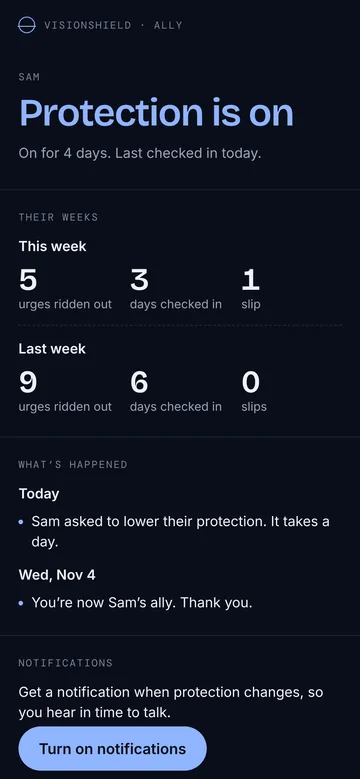
- Whether their protection is on, and since when
- When the app last checked in, to the day
- Urges ridden out and days checked in, each week
- Slips, only if they choose to share them
- Alerts when protection is turned down, a day before it happens
What you’ll never see
- Any site, app or browsing
- Anything they write
- Times of day
- Mood, sleep or stress
- Their unlock code
What each alert means
| Alert | What it means | A good response |
|---|---|---|
| They asked to turn protection off | It happens in a day, and they can still cancel. | Get in touch today. Ask how they’re going, not why they did it. |
| They asked to lower protection | A smaller change, also a day away. | A quick “how’s this week going?” is enough. |
| They kept protection as it was | They changed their mind and cancelled. | Tell them you noticed. That was a hard call. |
| They locked protection on | They chose a stretch of days when it can’t be turned off. | Say well done. Ask what made them decide. |
| They asked to end their lock early | It ends in a week, or sooner if you let them out. | Talk first. Ask what changed. There’s no rush. |
| Protection is off, or has a gap | Something switched off, or a setting came undone. | Could be an update or a new phone. Ask calmly. |
| The phone hasn’t checked in for two days | The phone may be off, or the app removed. | Worth a friendly message. |
That day’s wait is the whole idea. Nothing that weakens protection happens on the spot, so you hear about it while there’s still time to talk.
When they slip
Helps
- “Thanks for telling me. How are you doing?”
- Asking what was going on beforehand
- Remembering the steady days, not just the slip
- Keeping it between you
Backfires
- Lectures, disappointment or “again?”
- Asking for details of what they watched
- Checking up more because of one slip
- Making them earn your trust back
Shame makes people hide, and hiding keeps the whole thing going. The most useful thing you can be is someone they feel safe telling. Why shame backfires, with the research.
Things that are good to say
- “How’s this week been?”
- “When does it tend to get hard?”
- “Is there anything that would make tonight easier?”
- “I saw you kept protection on. That’s a good call.”
Questions
Do I need the app or an account?
No. Your page is the private link they sent you. It opens in any browser, and nothing asks for your name or email.
How do I get notifications?
Open the link and tap “Turn on notifications”. On iPhone, add the page to your Home Screen first (Share, then Add to Home Screen) and open it from there; that’s an Apple rule for web notifications.
What if I get an alert late at night?
Alerts about turning protection down arrive a day before the change happens, so there’s no need to act at 2am. A message the next morning is plenty.
Can I stop being their ally?
Yes. You can stop opening the page and turn off notifications at any time, and the page has a button to forget the link on your device. It’s kind to tell them, so they can ask someone else.
Can they see when I look at the page?
The page doesn’t tell them when you open it. It’s there for you to check when you want to.
What does “let them out” mean?
If they locked protection on for a while and then ask to end the lock early, it ends on its own after a week. Once you’ve been their ally for a week, you can end it sooner from your page. Only do it after you’ve talked. Turning protection off still takes a day after that.